


Shimeji: Screen Buddies
4.416.30K Reviews
App Specs
- Version
- 13.5
- Updated On
- License
- Free
- Downloads
- 10,000,000+
- Developer
- Digital Cosmos
- Categories
- Personalization
- Platform
- Android, iOS
Screenshots
 Analysis by AppCompare
I like the idea of a phone that feels a little less like a tool and a little more like my own space. Shimeji: Screen Buddies adds animated characters that wander across the screen, giving quiet moments between tasks a small dose of personality. It is a lighthearted kind of personalization, not a productivity system or a game I would sit down to play for hours.
A small change to the feel of your phone
The appeal is easy to understand: instead of choosing another static wallpaper or icon set, I can have a character moving around while I use my device. That makes the screen feel playful in a way a conventional theme cannot. Digital Cosmos has built this as a personalization app, and its central attraction is the presence of screen companions rather than a collection of tools to manage daily tasks.
That difference matters when deciding whether it is for you. If I want a screen that looks polished and stays visually quiet, a wallpaper or launcher theme is a better fit. If I enjoy little animated details and do not mind a character occasionally sharing the space with my apps, Shimeji offers a more lively alternative.
What you get without paying
The app is free to install, so trying the basic experience does not require an upfront purchase. Optional in-app purchases range from $2.49 to $28.99 per item. I would treat those as a choice to consider only after spending time with the free version: the right value depends on whether the available characters and customization are already enough to make the app enjoyable for you.
Its reach is substantial, with over 10 million installs and an average rating of 4.5 from around 414,000 ratings. Those figures suggest that screen pets appeal to a broad audience, but they do not tell me whether a particular character style or level of on-screen activity will suit your taste. I would use the free access to answer that more personal question before spending anything.
How it fits into an ordinary day
For me, this kind of app works best in short, casual moments: checking the time before heading out, pausing between messages, or glancing at the home screen while deciding what to do next. A wandering companion can make those familiar interactions feel less plain. It is a small bit of amusement, not something I would rely on to improve focus or keep me entertained through a long commute.
There is a practical trade-off, too. A moving character can add charm, but it also adds visual activity to a screen that may already be busy with notifications and widgets. I would start with a restrained setup and see how it feels during normal use before adding more. If the character draws my eye at the wrong time, simplifying the arrangement is more sensible than treating constant animation as a benefit in every situation.
Worth Reading Before You Choose

EA SPORTS FC Mobile 26 Is a Bigger Football Game, but It Takes Time

Flipboard Shows What News Apps Must Do Beyond the Feed

Switching to Android Auto Means Rethinking Your Driving Routine

Google Calendar Makes a Crowded Week Easier to Manage

Ludo King Makes the Most of the Minutes Between Plans

Baby Panda World Brings Quick Play to Modern Phones, but Its Game Library Feels Busy
Who is likely to enjoy it
I can see this suiting people who enjoy cute character art, anime-inspired decor, or small ways to make a phone feel more personal. It may also be a fun choice for someone who likes the idea of a digital pet but does not want a demanding care routine. The app is rated for Everyone, which makes its general presentation accessible, although the best fit still depends on whether you enjoy having animated figures on your screen.
On the other hand, I would skip it if I need a distraction-free display, find motion irritating, or prefer personalization that changes the overall look without adding moving elements. It is also not the obvious pick for anyone seeking a conventional mobile game: its charm is in the ambient screen presence, not in a structured challenge or a goal to complete.
What Exactly is Shimeji?
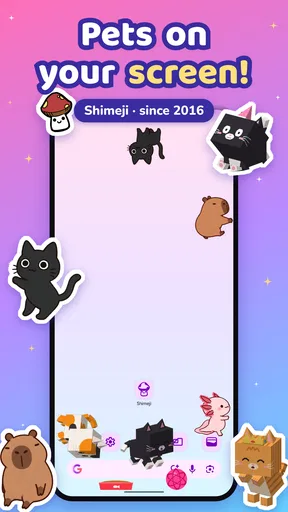
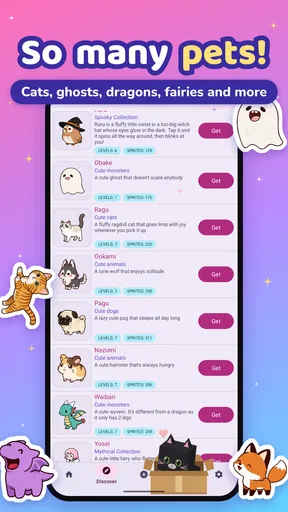
Alright, let’s get down to the nitty-gritty. Shimeji: Screen Buddies is an app that lets you have cute characters roam around your phone screen. Think of them as your digital companions who are always up for some fun. They can walk, climb, and even interact with each other right on your home screen.
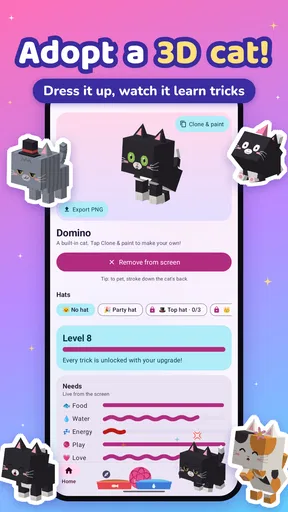
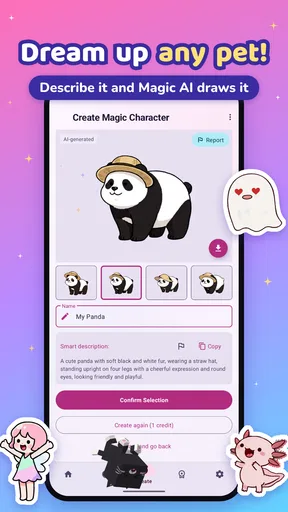
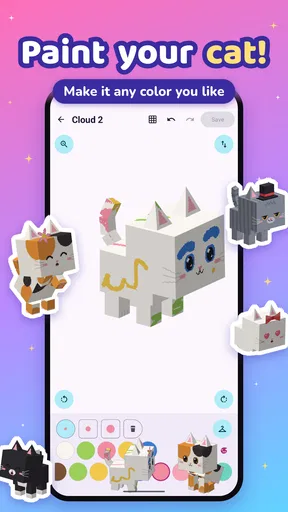
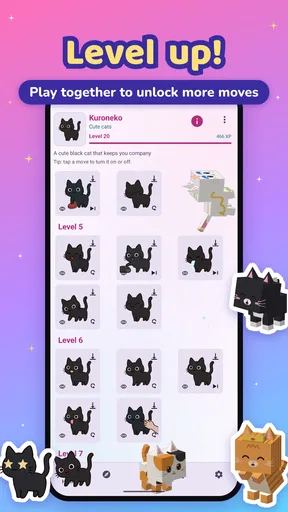
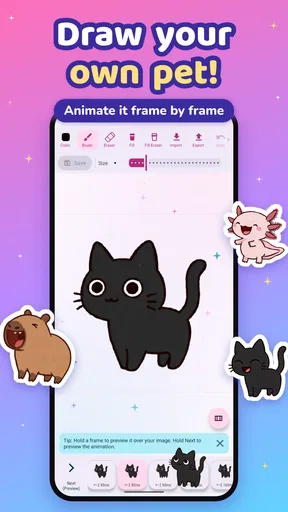
These aren’t just static images; these buddies are animated and full of life. Whether you’re a fan of anime, video games, or even just cute animals, there’s likely a buddy for you. They’re customizable, too. You can change their outfits, animations, and even their behavior to suit your mood.
Getting Started with Shimeji
Setting up Shimeji: Screen Buddies is super easy. Just download the app from the App Store or Google Play, and you’re pretty much ready to go. The app is free, but there are some optional in-app purchases if you want to unlock more characters or features.
Once you’ve installed it, you’ll be prompted to choose your first buddy. It’s like adopting a digital pet, but without the mess or the vet bills. You can choose from a variety of characters, each with their unique animations and quirks.
Customization Galore
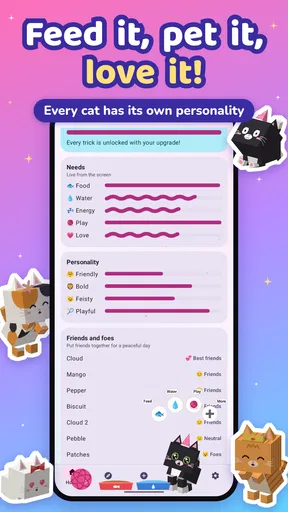
One of the coolest things about this app is the level of customization it offers. You can adjust the number of buddies on your screen, tweak their sizes, and even set their interaction levels. Feeling overwhelmed by too many buddies? No problem, you can easily tone it down or ramp it up if you’re in the mood for chaos.
The app developers have also thrown in seasonal themes and special events. So, around holidays, you might find your buddies wearing Santa hats or dressed as little pumpkins. It adds a fun, festive touch to your screen.
Performance and Usability
Now, let’s talk performance. You might be wondering if having animated characters on your screen will slow down your phone or drain your battery. From my experience, the app is surprisingly well-optimized. I didn't notice any significant lag or battery drain on my device. However, if you’re using an older phone, it’s something to keep an eye on.
The user interface is straightforward and intuitive. Even if you’re not tech-savvy, you’ll find navigating the app a breeze. Everything is laid out logically, from the settings to the customization options.
Making a fair choice about the paid options
The purchase range makes it worth pausing before unlocking anything. I would not assume that a higher-priced item automatically means a better everyday experience; what matters is whether the specific option appeals to you and whether you expect to keep using it. If you only want to test the novelty, stay with the free version. If you find yourself returning to the app and want more ways to tailor its look, then compare the in-app options carefully rather than buying on impulse.
One useful way to judge that value is to try the app in different parts of your routine. A character that seems charming while you are browsing at home might feel distracting when you are checking a work message or trying to read a crowded screen. I would keep the setup modest for a day or two, then decide whether extra customization would genuinely improve the experience or simply add more motion.
Small setup choices that make a difference
Customization is not only about making the screen busier. The ability to adjust the number and size of buddies gives me a way to preserve the basic idea while limiting how much space they occupy. I would begin with one character at a comfortable size, then change one setting at a time. That makes it easier to tell whether the character itself is enjoyable or whether the screen is becoming cluttered because of the setup.
Interaction levels are another setting worth approaching deliberately. If I want the buddy to be a quiet visual accent, I would avoid turning every available element up at once. If I am showing the app to a friend or simply want a more playful home screen, a livelier arrangement may be more fun. The useful point is that the same app can feel quite different depending on how much activity I allow.
There is also a difference between decorating a screen and making it easier to use. A character that moves across the home screen can be charming, but I would not treat it as a shortcut to finding apps or managing notifications. Keeping important icons and widgets easy to see should come first. The companion works best as an extra layer of personality, not as the organizing structure of the phone.
Where it sits among personalization apps
Compared with a wallpaper app, Shimeji is more animated and less set-and-forget: a wallpaper changes the background, while these companions bring movement into the space you already use. Compared with a launcher, it is a narrower kind of customization rather than a full redesign of the home screen. That focus is a strength if I want a little character without changing how my phone is arranged, but it is not the right substitute if I want new navigation, icon layouts, or a clean visual system.
It also differs from a traditional virtual-pet game. The pleasure here is in seeing a buddy appear as part of ordinary phone use, rather than following a structured game loop. I would choose it for atmosphere and amusement, not for progression or a task list. That distinction helps set expectations: the app can brighten a glance at the screen, but it should not be judged by the depth of a full game.
Compatibility and everyday practicality
The app’s current version is 10.0, and it supports devices running Android 8.0 or later. If you are considering it for an older phone, checking the operating-system version first is the practical step; the minimum requirement is more useful than guessing from the device’s age alone. The app is free to install, and its content rating is Everyone, so the main decision is whether animated screen companions suit the way you use your phone.
For a realistic test, I would install it before a relaxed evening rather than during a busy day. Choose one buddy, keep the activity limited, and use the phone normally: open messages, check the home screen, and move between everyday tasks. If the character makes those moments more pleasant without getting in the way, the app has found a place in your routine. If I start noticing it only as visual clutter, I would scale it back or remove it rather than force myself to enjoy the novelty.
Digital Cosmos has developed an app with an approachable premise, and its audience is reflected in around 16,000 written reviews as well as its 4.5 average rating. I take that as a sign that many people enjoy this particular style of personalization, not a guarantee that every screen or character will work for everyone. The practical test is still personal: whether you like the animation enough to keep it around.
Why You Should Give It a Try
So, why should you download Shimeji: Screen Buddies? Well, if you love adding a touch of whimsy and fun to your everyday digital experience, this app is for you. It’s like having the charm of Tamagotchis and the humor of desktop buddies, all packed into one neat little app.
Whether you’re having a bad day or just need a little break, watching these little buddies do their thing can be a delightful distraction. They’re not just eye candy; they genuinely add a little bit of joy to your daily routine.
Give it a go, and let me know which buddy you chose! They might just become your new favorite digital friends.
Pros
- Fun and interactive screen companions.
- Customizable characters and animations.
- Enhances phone personalization.
- Lightweight and doesn't slow down device.
- Regular updates with new content.
Cons
- Can be distracting during work.
- Limited free character options.
- Ads can be intrusive at times.
- Consumes battery if left active.
- Requires permissions for optimal use.
FAQs for Shimeji: Screen Buddies
What exactly is Shimeji: Screen Buddies?
Shimeji: Screen Buddies is a fun and interactive application that brings adorable, animated characters to your screen. These buddies move around, perform cute actions, and interact with each other, providing entertainment and a touch of whimsy to your device. They can be customized to suit your preferences, with a variety of characters to choose from.
How do I customize my Shimeji characters?
Customizing your Shimeji characters is simple. Once you download the app, you can choose from a variety of characters, each with unique animations and personalities. You can also adjust settings such as the number of characters on the screen and their behavior patterns. The app provides an intuitive interface for easy customization.
Will Shimeji: Screen Buddies affect my device's performance?
Shimeji: Screen Buddies is designed to be light on system resources, but having multiple characters active can slightly affect performance, especially on older devices. It's recommended to monitor your device's response and adjust the number of active buddies if needed to maintain optimal performance.
Is Shimeji: Screen Buddies safe to download?
Yes, Shimeji: Screen Buddies is safe to download from official app stores like Google Play and the Apple App Store. Always ensure you're downloading from legitimate sources to avoid malware or other security risks. The app adheres to standard privacy and security protocols to protect user data.
Can I use Shimeji: Screen Buddies offline?
Yes, Shimeji: Screen Buddies can be used offline. Once the app is installed and your characters are set up, you don't need an internet connection for them to animate on your screen. However, accessing new characters or updates will require an internet connection to download additional content.


